
Appearance
ESLint 基本使用
ESLint 是一个代码检查工具,可以识别并报告代码问题,提高代码风格的一致性,避免错误
ESLint 会根据配置文件中的规则,对代码进行检查,例如:"no-unused-vars": "error" 规则表示代码中有未使用的变量则会报错
安装 ESLint
sh
pnpm add --save-dev eslint@latestESLint 配置
在 ESLint 9 版本之前可以看一些配置文件是 .eslintrc.js,.eslintrc.yaml
但是,在 ESLint 9 版本之后使用的是 eslint.config.js 这个配置文件,并且将其放在项目的根目录中
下面是一个简单的 ESLint 配置:
js
// eslint.config.js
import { defineConfig } from "eslint/config";

export default defineConfig([
  {
    rules: {
      semi: "error",
      "prefer-const": "error",
    },
  },
]);
ESLint 9 之后采用扁平化配置的方式,向 defineConfig() 方法传递一个数组,数组的每个元素是一个配置对象
可以在这个数组中配置多个对象以实现针对性的配置,例如:可以通过 files 字段针对不同的文件进行不同的配置
具体的配置项字段可以在此链接查看:configuration-objects
js
import { defineConfig } from "eslint/config";

export default defineConfig([
  {
    files: ["*.js"],
    rules: {
      semi: "error",
    },
  },
  {
    files: ["*.vue"],
    rules: {
      semi: "warn",
    },
  },
]);
rules 字段配置项
rules 字段下的配置就是代码约束规则的具体配置,其配置项可以在此链接查看 eslint rules
rules 字段下的每个配置项可以设置以下的 3 类严重程度:
off / 0:设置为off或者0表示不启用该配置项warn / 1:设置为warn或者1表示违反该配置项时给出警告error / 2:设置为error或者2表示违反该配置项时报错
如果一个配置项需要 设置多个值,则以数组的形式设置:
js
import { defineConfig } from "eslint/config";

export default defineConfig([
  {
    files: ["*.js"],
    rules: {
      semi: "error",
      // 符合 unix 系统的换行符,违反则报错
      'linebreak-style': ['error', 'unix'],
    },
  }
]);
生成配置文件
ESLint 官方提供了生成默认配置文件的方式,使用以下命令,ESLint 会打开一个交互式的设置选择,我们可以选择需要的配置项
sh
pnpm create @eslint/config@latest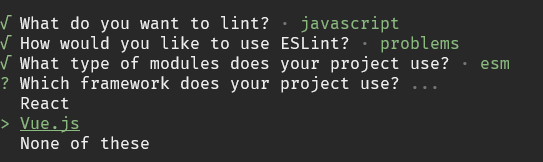
在一个 Vue 项目中,选择以下基本的默认配置即可:
What do you want to lint?(检查什么文件)-> 只选JavascriptHow would you like to use ESLint?(将如何使用ESLint)-> 选To check syntax and find problems(检查语法并发现问题)What type of modules does your project use?(使用什么类型的模块化)-> 选JavaScript modules (import/export)Which framework does your project use?(使用的是什么框架)-> 选Vue.jsDoes your project use TypeScript?(项目中是否使用了TS)-> 选YesWhere does your code run?(代码在什么环境运行)-> 选Browser和NodeWhich language do you want your configuration file be written in?(使用什么类型的配置文件格式)-> 选JavascriptWould you like to install them now?(是否安装对应的依赖)-> 选Yes
选择完以上的选项,会生成以下的配置:
js
// eslint.config.js
import js from '@eslint/js';
import globals from 'globals';
import tseslint from 'typescript-eslint';
import pluginVue from 'eslint-plugin-vue';
import { defineConfig } from 'eslint/config';

export default defineConfig([
  {
    files: ['**/*.{js,mjs,cjs,ts,mts,cts,vue}'],
    plugins: { js },
    extends: ['js/recommended'],
    languageOptions: { globals: { ...globals.browser, ...globals.node } },
  },
  tseslint.configs.recommended,
  pluginVue.configs['flat/essential'],
  { files: ['**/*.vue'], languageOptions: { parserOptions: { parser: tseslint.parser } } },
]);
与 prettier 规则的冲突
在同时使用 ESLint 和 prettier 的时候,两者的某些配置项是重叠的,如果,ESLint 和 prettier 对同一项的配置不同,会导致该项配置有冲突
例如:ESLint 和 prettier 对 semi 的配置不同
js
// .prettierrc.js
export default {
  semi: false, // 不要尾部的分号
};

// eslint.config.js
export default defineConfig([
  {
    files: ["*.js"],
    rules: {
      semi: ["error", "always"], // 总是需要尾部的分号,违犯报错
    },
  }
]);
以上的配置会在使用 prettier 格式化代码的时候,去掉尾部的分号,这样会导致 ESLint 的规则报错,所以,两者的某些配置是有冲突的
所以,为了避免这些冲突,我们可以将代码检查的工作交给 ESLint,而代码格式化的工作交给 prettier
可以安装以下两个依赖在 ESLint 中配置 prettier
eslint-config-prettier:关闭 ESLint 中与 prettier 冲突的规则eslint-plugin-prettier:将 prettier 作为 ESLint 规则执行
sh
pnpm add --save-dev eslint-plugin-prettier eslint-config-prettier在 eslint.config.js 文件中添加这两个依赖的配置
js
import js from '@eslint/js';
import globals from 'globals';
import tseslint from 'typescript-eslint';
import pluginVue from 'eslint-plugin-vue';
import configPrettier from 'eslint-config-prettier';
import pluginPrettierRecommended from 'eslint-plugin-prettier/recommended';
import { defineConfig } from 'eslint/config';

export default defineConfig([
  {
    files: ['**/*.{js,mjs,cjs,ts,mts,cts,vue}'],
    plugins: { js },
    extends: ['js/recommended'],
    languageOptions: { globals: { ...globals.browser, ...globals.node } },
  },
  tseslint.configs.recommended,
  pluginVue.configs['flat/essential'],
  { files: ['**/*.vue'], languageOptions: { parserOptions: { parser: tseslint.parser } } },
  configPrettier,
  pluginPrettierRecommended,
  { ... }, // 可以在下面添加其他配置
]);
编辑器插件
vscode 类编辑器可以安装 ESLint 插件,以在编辑器中显示 ESLint 提示

在编辑器中触发了 ESLint 规则的情况

相关链接
官方文档:https://eslint.org/docs/latest/
GitHub仓库:ihttps://github.com/eslint/eslint
anfu 的 ESLint 配置:https://github.com/antfu/eslint-config